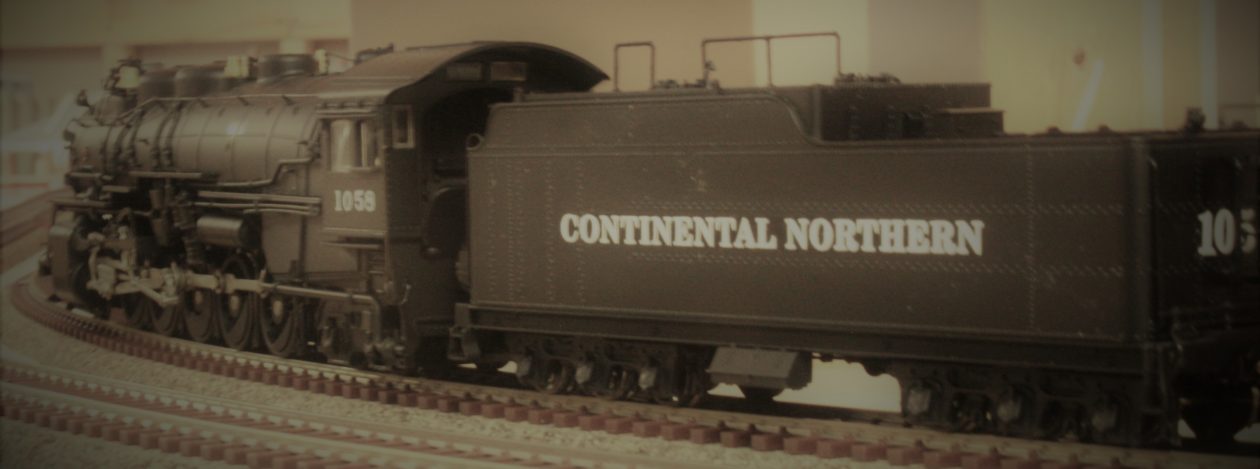
I had mentioned before (about 6 years ago) my wife had gotten me a MTH DM & IR 2-8-8-4 Yellowstone for Fathers Day. Now you may be wondering what the heck this has to do with anything. Well I’ll tell you.
For the last six years I have been going through all the “stuff” in storage around the basement looking for a DM&IR caboose that I received as a child. That and a S & S Hobbies RR crossing stencil that a came across just before I needed it. But to no avail.
My next thought was to just buy one. Again to no avail. You would think someone would make one, but no. Won’t even mention the fact that no one is making DM & IR oar cars anymore. In my search I did come across a Monroe Models laser cut caboose kit, but I just wanted simple.
I finally decided to bite the bullet and order the Monroe Models kit.
It does not include couplers, trucks or decals. The couplers and trucks weren’t a deal but the decals were. I found a set from Microscale, their part # 87-854. The problem was they deal in minimum orders, so I ended up ordering decals for containers that I didn’t have (I have since found some undecorated kits).
The Monroe Models Kit # 2214 is a work of art. It is a model of the the DM & IR standard wood caboose produced from 1909 to 1921 and lasted into the early 60’s. You can build it in it’s original configuration or as a “Modernized” version with the rear generator with access door, exhaust stack and vent. In addition, steel side frames were added. I opted for the “Modernized” version as it seemed right behind a Yellowstone.
First, the engine without a caboose:

Finally, the kit build…
The kit comes flat packed in a plastic sleeve.

And in that sleeve is a lot. There is the caboose core with outer wall veneers. Clear plastic for windows, a cast metal sprue with vents, stacks and marker light. There is also wire for the grab irons and rails. In addition there is a jig that needs some assembly for bending all those grab irons and rail. It also has a spot to hold the ladder frames to add the rungs.

The laser cutting is excellent, as the pieces released from the scrap wood with minimal cutting. The instructions are very well written and logical with minimal exceptions (will touch on one later).
I started with the caboose core and frame. They went together quickly (again fit is great) and I probably should have slowed down and gotten more photos, but…

When you assemble the subframe you have to already know which version you’re building. The cross pieces on the frame are tapered to outside walls if building the standard version and not tapered to support the side frame on the modernized version.
A step out of order…
As I had said, the instruction are laid out logically. That said, I noticed that where the caboose truck mounts looked a little low for clearance. There are two thick spacers and four thin spacers that looked like they would attach at this point for wheel clearance. I glued on the thicker spacers and tried the trucks, I ended up adding the other four to get proper clearance and coupler height.

I found in the very last step of the instructions they are mentioned. It is said to add these if building the modernized version. This would be better mentioned when doing the frame, before paint. Additionally, for proper wheel clearance the cross brace (where the arrow sticker on the left side is) had to be tapered. It would have been better to use the the tapered pieced here initially.
Back to the build…
Next step was to start adding laser etched side wall veneers. I started with the ends. I added the veneers and then built up the end doors and added them also.


The doors are built up three layers plus the window sill. Next was the side veneers and the side windows. On the left side I used the side veneer with two windows and the space for the generator compartment. The side windows are comprised of a frame and sill.

Side note: the instructions flip back and forth with the caboose body mounted to the floor/frame assembly and separated. I had decided not to mount the body to the frame until after it was all painted. The instructions show mounting the clear acetate to the windows when you are initially building them. I left the body off so that I could add the glass after painting.
The roof was next. This is done as a sub roof and then a finishing skin that is added to the sub roof. I also built the cupola at the same time so that I could test fit it into the hole as I added the roof. When installing the sub roof, because of the curve, I glued into place and held it with rubber bands until the glue had set.


As mentioned in the photo captions, all grab iron and grab rail locations are laser etched. Took all the guess work out of where they go and it also eliminates Monroe from including templates for those locations.
Time to paint…
Then it was off to the spray booth for primer.

While waiting for the primer to dry I took the time to assemble the grab iron jig. The jig is a laser cut piece of acrylic. Some assembly is required. There are angled and curved pieces that are glued on to aid in bending the various grab irons and rails.

After the primer had dried it was time for the finish paint.

With the paint on I added the window glass and assembled the basic caboose. Copula to body and body to frame. Then I did a test fit of the various cast metal parts.

I then started making the various grab irons and rail parts. Side note, in places where I could use commercially available pieces, I did. As I added the parts I painted them as I went.


In the last photo you can see the ladder. This is also assembled in the acrylic jig. I had some concerns how well it would work, but as everything else, it is well thought out and works beautifully.

Time for decals…
Once everything was added and painted it was time for decals. My preferred method is to cut out all the decals for a side.

Then, it just applying the decals.

One other side note, there are decals for the red and white stripe on the curved grab rails. I opted to paint them and save myself the frustration of trying to apply these.
And then it was done. On the workbench, it seemed kind of small for caboose. But behind the engine it truly is a rather diminutive caboose.

I loved the kit and the build. Now I just need to find a bunch of ore cars to fill in between the engine and caboose.
With the the caboose done it was on to the next build.
Till then, happy modeling …


